
TL;DR

Get pet supplies delivered free — and shop member deals
- Fast, free delivery on millions of items
- Access to Prime Big Deal Days deals on October 6–7
- Prime Video, Amazon Music and more included
Automatic pet feeders dispense preset portions on a schedule, which can help keep routine meals consistent while you’re busy. Before relying on one, test the actual portion, confirm it suits your pet’s food and health needs, and make a backup plan for jams, power loss, or time away.
Your feeder says “one serving,” but your cat’s bowl says otherwise. That small mismatch is why an automatic feeder needs a test run before it takes over breakfast.
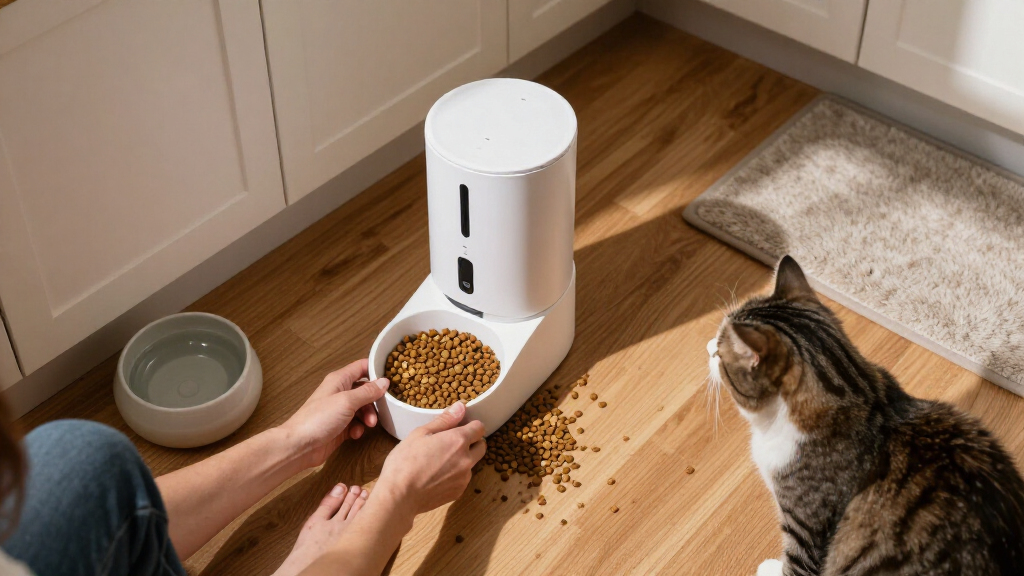
Automatic pet feeders dispense preset portions of food at scheduled times. They can help keep feeding times steady when work runs late or your morning starts with a barking dog and a missing shoe. Some models add app controls, alerts, or feeding logs; others stick to a simple timer and hopper.
In this guide, you’ll learn what a feeder can do, how to check its portions, which features matter, and when you still need direct care. The key idea is simple: automation can support your routine, but it cannot watch your pet, refresh water, or respond to an emergency.
Test several portions with your pet’s actual food; a feeder’s serving label may not match the amount dispensed.
Confirm the model supports your food type, especially if you plan to use wet food.
Introduce the feeder gradually and watch your pet eat before depending on its schedule.
Check how power backup and Wi-Fi loss affect your exact model, then make a backup plan.
Arrange in-person care for trips and ask your veterinarian about special diets or medication with meals.
What automatic pet feeders can—and can’t—do for your routine
Automatic pet feeders dispense preset portions of food at scheduled times, helping you keep meals more consistent when your routine gets busy. They can serve breakfast before an early shift or deliver a planned midday meal while you’re in a meeting. They do not check whether your pet seems unwell, refill water, or clean up a tipped bowl.
Think of a feeder like a kitchen timer that can release kibble: handy, but not a second pair of hands. Many dry-food models store kibble in a hopper and drop it into a bowl at set times. That can suit a healthy adult cat who tends to wake the household at dawn, or a dog whose lunch falls during a short commute.
According to the supplied product guidance, many feeders are designed for dry kibble. Some wet-food models use chilled compartments or ice packs, but you must follow their storage limits and clean them as directed. An ordinary dry feeder is not a safe place to leave wet food simply because its lid closes.
They can help keep feeding times predictable, but not every pet eats the same way. If your animal needs medication with meals, follows a special diet, or needs close monitoring, ask your veterinarian whether a feeder fits the care plan. A clock can release food; it cannot confirm your pet swallowed it.
A feeder handles a task, not the whole job of care. For trips or absences that require supervision, arrange a person to check on your pet.
automatic pet feeder with app control
As an affiliate, we earn on qualifying purchases.
As an affiliate, we earn on qualifying purchases.
How to check the portion before you trust the schedule
Test the feeder’s actual output with your pet’s food before relying on its preset serving. The amount can change with kibble shape and size, so a setting labeled “one portion” may not match the amount you expect. A quick measuring-cup test can catch the difference before it becomes a daily routine.
- Read the manual. Confirm the feeder supports your pet’s food and learn how its portion settings work.
- Run a serving into a measuring cup or onto a kitchen scale. Use the same kibble you plan to serve.
- Repeat the test. A few runs show whether portions vary, particularly if the kibble is large, small, or oddly shaped.
- Adjust the schedule with your veterinarian’s feeding guidance in mind. Don’t treat the machine’s serving label as a diet recommendation.
- Watch your pet eat. Check that food reaches the bowl and your pet can access it comfortably.
For example, imagine a cat whose feeder drops a loose heap at breakfast. The owner measures several test portions and discovers the heap holds more than the amount intended. Adjusting the setting before the feeder becomes part of the daily routine helps avoid relying on a guess.
Keep a note of the measured output and the setting you used. If you change kibble, test again: a dense, small pellet may pour differently from a broad, airy piece. Measure first, schedule second—and ask your veterinarian about feeding amounts if your pet’s needs are changing.
Which feeder features are worth paying attention to
The best feeder is the one that suits your pet’s food, schedule, and habits, not the one with the longest feature list. Check food compatibility, portion controls, meal scheduling, hopper capacity, cleaning, power backup, and how securely the unit stays in place. These basics affect everyday use more than a flashy app screen.
Here’s a practical comparison: a simple timer model may suit a cat that eats dry kibble at two set times, while an app-connected feeder may help an owner who wants remote scheduling or feeding notifications. Smart models can also offer meal-history logs, cameras, voice recordings, or pet-recognition sensors. Features and reliability vary, and connectivity can fail.
| Feature | Why it matters | What to check |
|---|---|---|
| Food compatibility | Food needs the right storage and dispensing setup. | Confirm the model supports your kibble or wet-food plan. |
| Portion and schedule controls | Your pet needs a routine you can set and verify. | Test output and check how many meals the model allows. |
| Cleaning and stability | Residue, spills, and tipping can disrupt feeding. | Look for removable washable food-contact parts and a stable base. |
| Power and connectivity | Outages or Wi-Fi loss can affect features. | Check battery backup and what works without internet. |
Picture a determined terrier nudging a lightweight feeder across a tile floor. A large hopper is no help if the dog can tip it open, so look for a secure design and test it under supervision. Useful features should solve a real problem; if you never need remote dispensing, a dependable local schedule may be enough.
How to introduce a feeder without startling your pet
Introduce an automatic feeder gradually while you’re at home, so you can see how your pet responds to its movement and sound. Some animals accept a new bowl quickly; others freeze at the first mechanical whirr. A few calm practice meals can reveal whether your pet will eat normally before the feeder becomes part of the routine.
Start with the feeder beside your pet’s usual bowl, turned off, so it becomes familiar without any noise. Then try a small scheduled release while you are nearby. If your cat backs away at the clunk of kibble or your dog tries to shove its nose into the chute, pause and give the animal time to investigate.
For example, a cautious cat may need several days to approach a feeder that makes a sharp click. You can offer a familiar meal nearby, then watch whether the cat eats comfortably after the machine runs. Don’t assume that a food drop proves acceptance; confirm your pet actually eats and that food lands where it can reach.
Supervise early use and check for access or choking risks, especially if your pet is small, enthusiastic, or prone to chewing equipment. Secure the feeder so it cannot slide or tip. Comfort matters as much as convenience: a scheduled meal has little value if the sound or design keeps your pet from eating.
What to do about jams, power cuts, and Wi-Fi failures
A feeder can fail even when you set it up correctly, so check how your model behaves during a jam, power cut, or internet outage. Battery backup may preserve scheduled dispensing during a power loss, while Wi-Fi loss may disable remote controls or alerts. Local schedules may continue on some models, but you need the manual or a home test to know for yours.
Run the feeder while you’re home and inspect what happens if you disconnect Wi-Fi or remove its main power source, following the manufacturer’s instructions. Check whether the unit keeps time, whether a meal still drops, and whether you receive an alert. A phone notification is useful only if the feeder can connect and the app delivers it.
Consider a weekday morning: the feeder clicks, but no kibble reaches the bowl because a piece has bridged the chute. If you are home, you can fix it and learn what the jam looks like. If you are away, a person checking in may notice the missed meal. That’s why a practical backup plan matters more than a reassuring status icon.
Keep food-contact parts clean, follow the maker’s cleaning directions, and promptly address spills or moisture. Wet-food models need particular attention to storage instructions and cleaning. Test reliability before you depend on it, and don’t treat remote access as a replacement for an in-person check.
When a feeder needs help from a person
An automatic feeder cannot replace a pet sitter because it only handles scheduled food delivery. It cannot notice that your dog is limping, refresh a water bowl, clean up a mess, or respond to an emergency. Use it to support everyday routines, not as the sole care plan for a trip or an absence that calls for supervision.
For instance, a weekend away still needs someone to check on your pet, even if a smart feeder sends meal logs to your phone. The visitor can confirm your pet is eating, check water, look for unusual behavior, and deal with a tipped bowl or jam. Those simple observations are outside the feeder’s reach.
Multiple pets add another wrinkle. One fast eater may steal a slower pet’s food, even when both bowls receive scheduled portions. Separate feeders are often more reliable if pets eat at different speeds or need different diets; pet-identification features may help, but their performance varies by product.
If your pet needs medication with meals, a special diet, or close monitoring, ask your veterinarian whether an automatic feeder fits the plan. Direct oversight may matter more than convenience for pets with specific health needs. A feeder can make routine care easier when the routine is suitable; it should not decide the care plan on its own.
Frequently Asked Questions
Can an automatic feeder replace a pet sitter?
No. It can release scheduled portions, but it cannot check your pet’s health, refresh water, clean up, or respond to an emergency. Arrange in-person care for trips or absences that need supervision.
Do automatic feeders work with wet food?
Some models support wet food with chilled compartments or ice packs, but a standard dry-food feeder may not. Check the manufacturer’s storage instructions and clean the food-contact parts promptly.
How can I tell how much food the feeder dispenses?
Run a test portion into a measuring cup or weigh it, and repeat the test because kibble shape and size can affect the output. Set the schedule with your veterinarian’s feeding guidance in mind rather than relying only on the machine’s serving label.
What happens if the power or Wi-Fi goes out?
It depends on the model. Battery backup may preserve scheduled dispensing during a power loss, while Wi-Fi loss may disable app controls or alerts; check the manual and test the behavior while you’re home.
Can one feeder serve multiple pets?
Sometimes, but one pet may eat another’s portion, especially if they eat at different speeds or need different diets. Separate feeders are often more reliable, and any pet-recognition features should be tested rather than assumed to work perfectly.
How often should I clean an automatic feeder?
Follow the manufacturer’s cleaning directions and regularly clean food-contact parts. Address spills, residue, and moisture promptly; wet-food models need particular attention to their storage and cleaning instructions.
Conclusion
Choose a feeder for the job your pet actually needs done, then test the food, portions, schedule, and backup behavior while you’re home. That short trial turns a shiny gadget into a tool you understand—and gives you time to spot problems before a missed meal.
Remember: a feeder can keep the bowl on a clock, but care still has a human heartbeat. Let the machine handle the routine; keep a person close enough to notice when your pet needs more.
Halloween Picks
halloween
As an affiliate, we earn on qualifying purchases.